

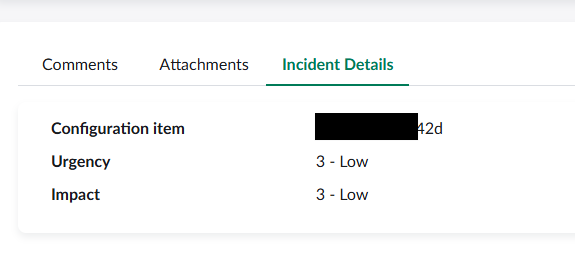
This article describes how to display additional fields in the Standard Ticket page of Employee Center. The end result is a tab like the Incident Details tab below
Step 1: Create a Service Portal Widget
HTML Template
<div class="panel panel-default b panel-wrapper">


   <!-- <div class="panel-heading b-b">

    </div> -->

    <div class="panel-body">

      <dl class="ticket-fields" ng-if="data.fields.length > 0">
        <dt class= "col-md-3 col-sm-12 col-xs-6 break-word"
            ng-if="field.value && (field.type != 'decimal' || field.type == 'decimal' && field.value != 0)"
            ng-repeat-start="field in data.fields">{{field.label}}</dt>
        <dd class= "col-md-9 col-sm-12 col-xs-6 break-word"
            ng-repeat-end ng-switch="field.type"
            ng-if="field.value && (field.type != 'decimal' || field.type == 'decimal' && field.value != 0)">
          <div ng-switch-when="glide_date_time" title="{{field.display_value}}">
            <sn-time-ago timestamp="::field.value"></sn-time-ago>
          </div>
          <div ng-switch-when="multi_small"><pre class="multi-lines">{{field.display_value}}</pre></div>
           <div ng-switch-when="glide_list"><span class="multi-lines">{{field.display_value}}</span></div>
          <div ng-switch-when="html" ng-bind-html="field.value"></div>
          <div ng-switch-default><span class="pre-wrap">{{field.display_value}}</span></div>
        </dd>
      </dl>


    </div>


  </div>
CSS
.ticket-fields {
  margin-left: -7px;
  margin-right: -8px;
  -webkit-margin-before: 0;
  -webkit-margin-after: 0;
  display: flex;
  flex-wrap: wrap;
}
dt {
  //font-weight: normal;
  margin-bottom: 10px;
}
dd {
  margin-bottom: 10px;
}
.multi-lines {
  white-space: pre-wrap;
  word-break: break-word;

}
Server Script
(function() {


	data.table = options.table || $sp.getParameter("t") || $sp.getParameter("table") || $sp.getParameter("sl_table");
	data.sys_id = options.sys_id || $sp.getParameter("sys_id") || $sp.getParameter("sl_sys_id");

	if (!data.sys_id && options.sys_id_required != "true")
		data.sys_id = "-1";

	var gr = new GlideRecord(data.table);
	gr.get(data.sys_id);


	var fields = $sp.getFields(gr, options.fields);
	fields = addLineBreakToLists(fields);
	data.fields = fields;


	//function to change the display value of list fields to have a line break in between values instead of a comma
	function addLineBreakToLists(fieldValues) {
		for (var i in fieldValues) {
			if (fieldValues[i]['type'] == 'glide_list') {
				fieldValues[i]['display_value'] = fieldValues[i]['display_value'].replace(', ', '\n');
			}

		}
		return fieldValues;
	}
})()
Step 2: Add a tab to the Standard Ticket Page
Go to the Standard Ticket Page configuration record for the table you want to add the tab to.
Once in the configuration form, go to the Tabs related list and click New.
Tab Configuration
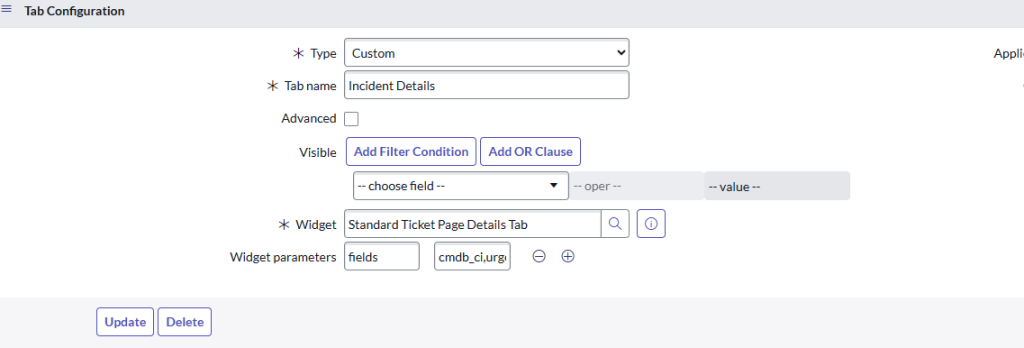
The widget parameters value should be a comma separated list of fields to be displayed, for example cmdb_ci,urgency,impact