

Sometimes users need to move all attachments from one record to another, this is a UI Action which calls a UI Page in a modal allowing the user to select the record they want to move the attachments to.
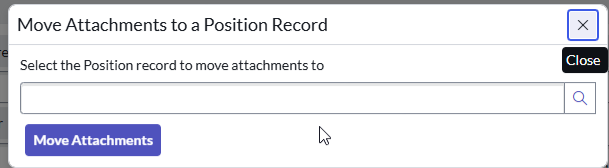
HTML for UI Page
<?xml version="1.0" encoding="utf-8" ?>
<j:jelly trim="false" xmlns:j="jelly:core" xmlns:g="glide" xmlns:j2="null" xmlns:g2="null">
<style type="text/css">
#cancel_button{
	display : none;
}
#create_case_button{
	padding-top:10px;
}
</style>

<j:set var="jvar_source_sysid" value="${sysparm_source_sysid}"/>
<j:set var="jvar_source_table_name" value="${sysparm_source_table_name}"/>
<j:set var="jvar_target_table_name" value="${sysparm_target_table_name}"/>
<p>Select the ${sysparm_target_table_display_name} record to move attachments to</p>

<g:ui_form>
<g:ui_reference name="target_sysid" id="target_sysid" table="${sysparm_target_table_name}" query="${sysparm_target_table_filter}" completer="AJAXTableCompleter" ng-model="grade"/>
<div id="create_case_button">
  <g:dialog_buttons_ok_cancel ok_text="Move Attachments" ok="return true" cancel="return cancel()"/>
  <input type="hidden" id="source_table_name" name="source_table_name" value="${jvar_source_table_name}" />
  <input type="hidden" id="source_sysid" name="source_sysid" value="${jvar_source_sysid}" />
  <input type="hidden" id="target_table_name" name="target_table_name" value="${jvar_target_table_name}" />
  </div>
</g:ui_form>
</j:jelly>
Processing Script for UI Page
var sourceTable = source_table_name; // Source table name
var sourceSysId = source_sysid; // Replace with the sys_id of the source record
var targetTable = target_table_name; // Target table name (can be the same or different)
var targetSysId = target_sysid; // Replace with the sys_id of the target record

// var sa = new GlideSysAttachment();
// var attachments = sa.getAttachments(sourceTable, sourceSysId);

// while (attachments.next()) {
//     var attachment = sa.copy(sourceTable, sourceSysId, targetTable, targetSysId, attachments.sys_id);
//     gs.addInfoMessage('Copied attachment: ' + attachments.file_name);

//     // Delete the original attachment to complete the "move"
//     sa.deleteAttachment(attachments.sys_id);
//     gs.addInfoMessage('Deleted original attachment: ' + attachments.file_name);
// }
var targetGR = new GlideRecord(target_table_name);
targetGR.get(target_sysid);

var attGR = new GlideRecord("sys_attachment");
attGR.addQuery("table_name", source_table_name);
attGR.addQuery("table_sys_id", source_sysid);
attGR.query();
while (attGR.next()) {
    attGR.setValue("table_name", target_table_name);
    attGR.setValue("table_sys_id", target_sysid);
    attGR.update();
    gs.addInfoMessage(attGR.file_name.getDisplayValue() + ' moved to <a href="/' + target_table_name + '.do?sys_id=' + target_sysid + '" target="_blank">' + targetGR.getDisplayValue() + '</a>');
}
var url = '/nav_to.do?uri=' + source_table_name + '.do?sys_id=' + source_sysid;
response.sendRedirect(url);
Set the target table in the UI Action which calls the UI Page. UI Action is a client action.
UI Action
function openModal() {
    var gm = new GlideModal("move_attachments");

    //Sets the dialog title
    gm.setTitle('Move Attachments');
    gm.setWidth(550);
	gm.setPreference("sysparm_source_table_name", 'incident');
	gm.setPreference("sysparm_source_sysid", g_form.getUniqueValue());
	gm.setPreference("sysparm_target_table_name", 'sc_req_item');
	gm.setPreference("sysparm_target_table_display_name", 'Request Item');
	gm.setPreference("sysparm_target_table_filter", '' + g_form.getUniqueValue());

    //Opens the dialog
    gm.render();